Project Billing Automation in Singapore: From Subcon Timesheets to a Client-Ready Invoice Pack
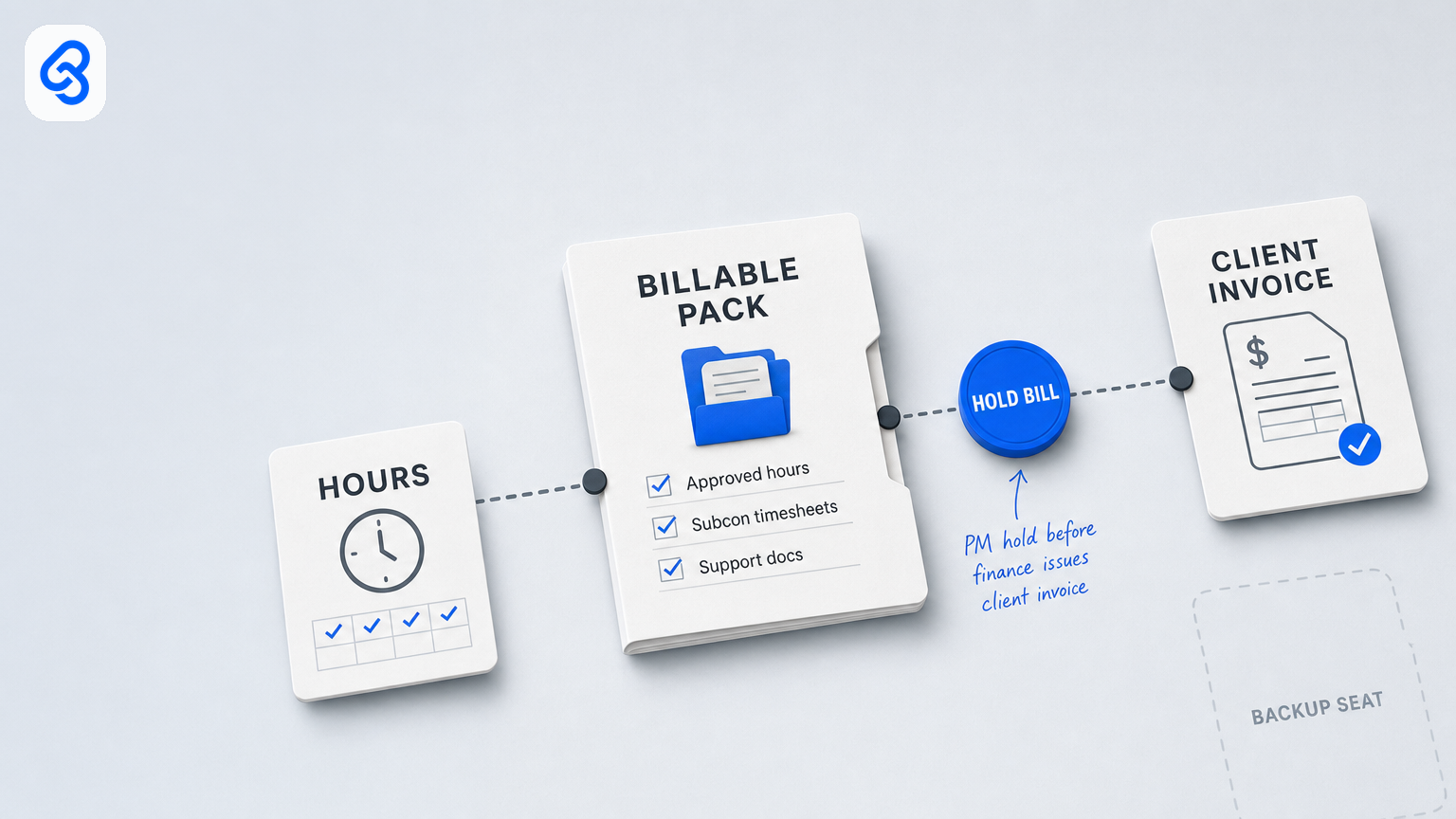
Project billing automation in Singapore: from subcon timesheet to client invoice pack
Project billing automation should help Singapore SMEs move approved subcontractor and project hours into a complete, reviewable client invoice pack, without treating every payroll-approved hour as billable. The practical aim is a visible handoff: collect the approved hours or milestone evidence, identify exceptions, have a named person approve the billable pack, then hand it to finance to issue the client invoice.
That distinction matters. A subcontractor timesheet may support payroll or supplier payment, but it does not by itself establish what a client agreed to pay. Overtime, out-of-scope work, duplicate milestones and missing job references should be held for review rather than silently converted into invoice lines.
This guide sets out a simple operating model for project billing automation in Singapore. It focuses on the handoff from approved hours or milestone evidence to a bill-ready pack, not payroll approval, supplier accounts payable, or a full project-accounting system. Automation can file, route, flag and remind; a named PM or operations owner approves what is billable, and finance remains responsible for issuing the client invoice.
What project billing automation should do
For this workflow, project billing automation means organizing the steps between completed work and the client invoice. It can:
- Capture approved hours or milestone evidence through a consistent intake route.
- Match each pack to a client, job, billing period or milestone, and supporting record.
- Keep approved payroll hours separate from proposed client-billable hours.
- Flag missing information, possible duplicates, unagreed overtime and work outside the contract or purchase-order scope.
- Route clean packs and exceptions to named owners, with a backup and a due date.
- Preserve the decision and supporting documents so finance can issue from an approved pack.
It should not infer a client’s billing rules from a timesheet, decide whether disputed overtime is chargeable, or issue an invoice simply because a period has ended. If the organization has not documented its rates, scope and approval rules, automating the queue will make an unclear process move faster, not make it correct.
The process is different from timesheet approval for payroll. If hours are not yet approved, resolve that upstream first using the timesheet and overtime approval workflow. It is also different from supplier invoice processing: this article concerns accounts receivable, where the business bills its client, rather than accounts payable, where it approves a supplier payment.
Why the Singapore context matters
Singapore SMEs do not need to begin with a major system replacement to improve a billing handoff. A clear shared queue, controlled access to supporting files and an agreed approval route can be a sensible starting point. IMDA’s Industry Digital Plans provide sector-oriented guidance for SMEs considering digital adoption; they are a reference for planning, not proof that a particular billing tool or workflow is suitable.
For companies handling staff and subcontractor records, access and sharing also need attention. Timesheets and billing packs can include personal data. The PDPC’s overview of the Personal Data Protection Act explains its relevance to the collection, use, disclosure and care of personal data in Singapore. Use company-controlled storage, limit access to people who need the records, and avoid putting identifiable job or personnel information into unapproved tools.
Digitalization should follow the actual billing rules of the business. A time-and-materials consultancy, a fit-out contractor and an IT services firm may all need different evidence and approval thresholds. The common requirement is not a particular software brand: it is a reliable link between work performed, the terms agreed with the client, a human-approved billable pack and the invoice finance ultimately issues.
A five-step handoff runbook
Use this as a starting point. Assign a primary owner and a backup to each approval step before automating reminders.
1. Trigger: define when a pack is ready to enter billing
Choose one intake event, such as approved hours for a billing period or a completed milestone with its required evidence. Give every item a unique pack ID and capture the client, job or work-breakdown reference, period or milestone, and the source record.
Avoid treating an informal message or a screenshot as approval. If a request arrives through chat, direct the sender to the established form or shared intake route so the record can be tracked and completed.
2. Extract: collect fields and supporting evidence
A useful pack record can include:
- Client and job or project reference.
- Billing period or milestone ID.
- Staff or subcontractor line and approved hours reference.
- Proposed billable hours or milestone amount, kept distinct from payroll hours.
- Applicable rate-card, statement-of-work or purchase-order reference.
- Supporting timesheet, acceptance record or deliverable link.
- Pack owner, backup, due date and current status.
The automation can check whether required fields and links are present. It can flag possible duplicate periods or milestones, missing job IDs, overtime without documented client agreement, and apparent scope exceptions. These are prompts for review, not automated billing decisions.
3. Route: send exceptions to the right person
Send complete, apparently routine packs to the designated PM or operations reviewer. Route incomplete or unusual items with a specific reason, for example:
- `MISSING_JOB`, no usable job reference.
- `NEEDS_INFO`, evidence or required fields are missing.
- `OT_NOT_AGREED`, overtime has no recorded client approval.
- `OVER_SCOPE`, the item appears outside the approved scope.
- `DUPLICATE_CHECK`, a similar job, period or milestone is already in the queue.
- `HOLD_BILL`, do not pass the item to finance until the named reviewer releases it.
A specific reason is more actionable than a generic request to “fix the pack.” The reviewer should be able to return it to the submitter with the missing item and a clear next step.
4. Human gate: approve the billable pack
A named PM or operations owner should approve the client-billable lines, return the pack, or place it on hold. Record who made the decision and when. Define in writing what a backup may approve; new rates, disputed scope, first-time billing arrangements and write-offs may require a more senior reviewer. When extra scope needs a signed variation before it may enter this pack, use the project variation and change-order approval desk. That chapter is scope to a priced VO and a named approve, not a twin of this billable pack.
Finance should receive only packs marked ready for billing. Finance then checks the handoff and issues the client invoice through the organization’s accounting process. Pack approval and invoice issuance are separate steps: neither elapsed time nor an unanswered reminder should count as consent. Once that client invoice is overdue, the chase sits on the AR collections and debtor-chase desk, not back in this billing pack.
5. Tracker: make the queue usable by a backup
Keep a shared tracker or workflow view with a stable ID, client, job, period or milestone, owner, backup, due date, status, exception reason, evidence link, pack approval and invoice-issued status. Use a controlled set of statuses such as `Needs info`, `Ready for review`, `Exception`, `Hold`, `Pack approved`, `Ready for finance` and `Invoice issued`.
The tracker should make it possible for an authorized backup to see what is waiting without relying on the primary approver’s personal mailbox or device. Keep the underlying documents in company-controlled storage with appropriate access restrictions.
Worked example: separate approved time from billable time
Suppose a weekly project record contains 44 approved hours, including four hours of overtime. The client agreement covers the regular time-and-materials hours, but the overtime approval is not documented. The workflow creates a pack, flags the overtime for review and holds the pack from finance. A named reviewer checks the agreement, records the decision and approves only the lines supported by the billing terms. Finance issues an invoice from the approved pack.
The point is not that overtime is always non-billable. It is that payroll approval and client billing are different decisions. The organization should retain the agreement and approval basis for whichever decision is made.
Who owns each decision?
Write the roles down, even if a small company assigns more than one role to the same person.
- PM or operations reviewer: decides which work is billable under the client agreement and approves, returns or holds the pack.
- Finance or accounts receivable: receives the approved handoff and issues the client invoice through the accounting process.
- Write-off or credit approver: decides who can waive charges or authorize a correction, with a defined threshold for escalation.
- Site lead or subcontractor coordinator: supplies or validates operational evidence; submitting hours does not itself authorize a client charge.
- Automation: files, checks required fields, routes, reminds and records status. It does not approve disputed charges or issue an invoice by default.
If one person performs multiple roles, document the dual role, backup and cases that require a second review. The aim is a traceable decision, not a large-company approval structure imposed on every small business.
Keep the first version simple
A shared spreadsheet, company email and document repository may be enough when billing volume is manageable, one reviewer can meet the billing timetable, and the business can maintain a clear exception queue. Start by fixing the intake, required fields, status definitions, owner and backup. Then automate filing and reminders around that process.
Consider a dedicated project or professional-services billing system when the current setup cannot reliably handle the actual workload, for example, when multiple entities, complex rate cards or detailed work-in-progress controls exceed what the shared tracker can manage. Choose based on documented requirements and the accounting handoff, rather than assuming that buying a larger system will resolve unclear billing rules.
For a process review, start with the live handoff and its exceptions. Lynqra’s workflow automation services describe the broader service context; a useful first conversation should establish whether a smaller change to the existing process is sufficient.
DIY automation: where to stop
A low-risk first build can use a shared intake mailbox or form, company storage, a controlled tracker and scheduled reminders. For example:
1. Label or log incoming packs by status.
2. Save attachments to an access-controlled company folder and add the link to the tracker.
3. Check that the required fields and supporting links are present.
4. Remind the named owner before the review deadline.
5. Escalate once to the backup if the pack remains unresolved, then stop and leave the decision visible.
Do not automate a change to `Pack approved`, `Ready for finance` or `Invoice issued` merely because a deadline passed. Do not collapse payroll-approved hours and client-billable hours into one field. Keep invoice calculations, tax treatment and invoice issuance within the organization’s established accounting controls; seek appropriate professional advice where the rules are uncertain.
Before going live, test a routine pack, a missing-information pack, a possible duplicate and an overtime or scope exception. Confirm that the backup can access the queue and evidence, and that the workflow stops rather than forwarding an unresolved item to finance.
Common failure modes to prevent
- Billing every approved timesheet row: hours approved for payroll are not automatically chargeable to the client.
- Unagreed overtime on an invoice: require documented agreement or a named decision before the line enters a bill-ready pack.
- Chat as the only record: a message or thumbs-up is difficult to track as a complete approval; preserve the decision and evidence in the shared queue.
- No leave cover: name a backup and define what that person may approve.
- Duplicate milestone billing: check client, job and period or milestone before finance issues the invoice.
- Unclear scope or rates: flag the item and refer to the contract, rate card or change approval; do not ask automation to guess.
- Automatic invoice release after a timeout: reminders and escalation are useful, but silence is not billable approval.
A practical checklist for this week
- Draw the process from approved hours or milestone evidence to pack approval and invoice issuance.
- Name the primary reviewer, backup, finance handoff and write-off approver.
- Create one intake route and a shared queue with controlled status values.
- Separate approved payroll hours from proposed client-billable hours.
- List the evidence needed for each billing type and the exceptions that stop a pack.
- Review recent billing corrections or disputes and identify what information would have prevented each one; do not assume automation alone will remove them.
- Test the leave-cover path before relying on reminders or integrations.
Next step
If approved subcontractor hours are difficult to turn into a reliable client invoice pack, bring a representative, appropriately redacted example of the current handoff to a Lynqra consultation. The first discussion can map the intake, exceptions, approvals and finance handoff, then determine whether your existing tools are enough or a more structured system is warranted. Do not share personal or confidential project information unless it is appropriate and authorized to do so.