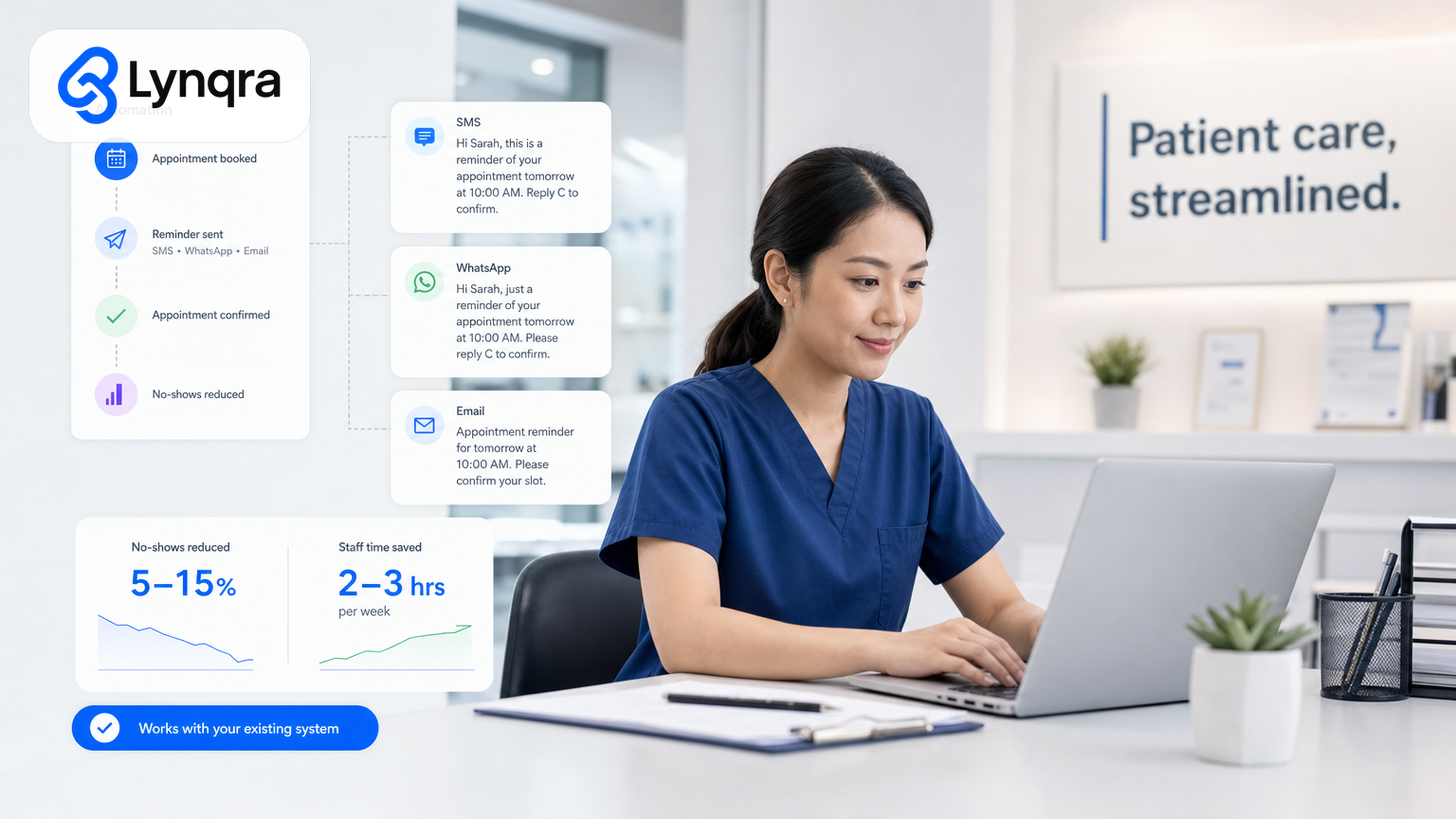
Most Singapore clinic operators manage appointment reminders the same way they did five years ago: manual calls, text templates copied and pasted, or hoping patients remember on their own. The result is predictable. No-show rates climb. Staff spend hours on repeat phone calls. Revenue slips away quietly.
Appointment reminder automation fixes this without forcing your team onto yet another software platform. You automate the reminders while keeping your existing booking system, your staff workflows, and your patient data exactly where they are now.
When planning appointment reminder automation in Singapore, compliance and data protection are essential considerations. Data protection officer responsibilities and compliance fundamentals provide a foundation for handling patient information securely. Additionally, IMDA's SMEs Go Digital program supports Singapore clinics and health practices in adopting digital tools like automated reminders.
This guide walks you through what appointment reminder automation actually does, why it matters for Singapore clinics and small health practices, how to set it up right, and what to watch out for before you start.
What is appointment reminder automation?
Appointment reminder automation sends patients automated SMS, WhatsApp, email, or voice reminders before their scheduled appointments, without anyone manually typing or dialing. The system pulls appointment data from your booking system (or a spreadsheet, or your calendar), checks the appointment date and time, and fires off a reminder 24 hours before, or one hour before, or on whatever schedule you choose.
The key word is automated. No staff member sits down at 5 p.m. and starts making calls. The system does it.
A typical flow looks like this: patient books appointment in your clinic system (or you enter it manually), reminder rule fires automatically at a set time before the appointment, patient receives SMS or WhatsApp message, patient confirms or cancels, your team sees the confirmation status in a dashboard or gets a notification.
That last step matters. Automation that reminds patients is only half the value. Capturing whether they confirmed, cancelled, or ignored the reminder lets you manage no-shows, reschedule faster, and fill empty slots.
Why appointment reminder automation works for Singapore clinics
No-show rates in Singapore health services vary, but even a 10-15% no-show rate on a busy clinic schedule is significant. Each missed appointment is lost revenue. Each missed appointment also means your staff prepared a room, reserved a doctor or nurse slot, and blocked time that could have gone to another patient.
Manual reminders are expensive in hidden ways. A clinic with 40 appointments per day might have one staff member spending 2-3 hours per week on reminder calls. That is time they cannot spend on reception, patient follow-up, billing, or scheduling the next round of appointments. Over a year, that is 100-150 hours of labor for reminder phone calls alone.
Automated reminders cut that time sharply. SMS or WhatsApp reminders are less intrusive than a phone call, more reliable than email (which patients often miss), and faster to process than a manual call. Patients can confirm or cancel by replying to the message, and you get an instant record of their response.
From a revenue perspective, even a 5% improvement in show rate translates directly to additional patient throughput and income. That is not small for a small clinic.
How appointment reminder automation fits into your existing workflow
Here is what matters for a Singapore SME clinic: you do not need to replace your booking system to get reminders working.
If you use a clinic management system like Medicore, Hippogriff, or another local provider, many of these systems have built-in reminder features. Check your system documentation or contact your provider first. You may already own the capability.
If you use a simpler setup (Google Calendar, a spreadsheet, a paper diary, or a mix of tools), automation still works. You can connect your calendar or spreadsheet to a reminder service via email-to-SMS gateways, WhatsApp Business API integration, or AI workflow automation that reads your data and sends reminders through channels your patients already use.
The key is that automation fits around your existing tools, not the other way around. You keep your clinic system. You keep your spreadsheets. You add a reminder layer on top.
This is important because migration is expensive and risky. Switching to a completely new clinic management system costs time, training, data cleanup, and staff learning curves. Many Singapore SMEs, especially small clinics with 2-4 staff, cannot absorb that cost and risk. Automation that works inside your current setup is far cheaper and faster to roll out.
Common appointment reminder automation approaches for Singapore clinics
Email-based reminders: Your clinic system or spreadsheet exports appointment data to a list. You set up a rule in Gmail or an email service to send templated reminders. Low cost, works if patients check email, but often gets filtered as spam and has lower response rates than SMS.
SMS gateway: You connect your booking system to an SMS provider (Twilio, Sinch, local Singapore providers). Appointments automatically trigger SMS reminders at set intervals. Higher cost than email (per SMS), but much higher open and response rates. Common in Singapore clinics.
WhatsApp Business API: For clinics with WhatsApp-savvy patients, WhatsApp messages have very high open rates and feel natural. You connect your booking system to WhatsApp Business via a provider like Twilio or MessageBird. Cost is lower than SMS in some markets, and patients often prefer it. Growing rapidly in Singapore health services.
AI workflow automation: A custom automation reads your appointment data from Google Sheets, a calendar, or your clinic system API, and sends reminders via email, SMS, WhatsApp, or Telegram depending on what your patients prefer. This approach is flexible and works well if your clinic has non-standard data (custom patient fields, specific reminder timing, approval workflows). It costs more upfront but handles edge cases and integrations that template systems do not.
IVR (Interactive Voice Response) calls: The system calls patients automatically and plays a recorded message. Older method, now less common because SMS and WhatsApp are cheaper and less intrusive. Still used in some clinics for urgent or complex reminders.
For most Singapore clinics with under 100 patients per week, SMS or WhatsApp via a straightforward gateway is the sweet spot. Cost is predictable, setup is fast (days, not weeks), and staff do not need new training.
Data security and PDPA compliance
Patient data is sensitive. Reminders mean you are sending patient names, appointment details, or clinic information via SMS or WhatsApp. Singapore clinics must comply with the Personal Data Protection Act (PDPA) when handling patient information.
Key steps you must take:
Consent: Patients must consent to receive reminders via SMS or WhatsApp. Get this consent when they first book, update their record, or start using the reminder service. Keep records of when they consented and via what channel.
Data minimization: Only send what is necessary. "You have an appointment on 15 June at 2 p.m." is enough. Do not include patient medical history, previous diagnoses, or sensitive notes in a public message.
Secure transmission: Use providers that encrypt messages in transit. SMS and WhatsApp Business API both use encryption. Avoid sending appointment details via unencrypted email or plain text messages to personal numbers.
Data retention: Keep reminder logs and patient consent records for audit purposes. Delete old data when no longer needed (usually after appointment completion plus a grace period).
Breach reporting: If patient data is exposed (e.g., SMS delivery error sends a message to the wrong number), you must be able to detect it, log it, and report it if required. Have a simple process in place.
The PDPC has published guidance on data protection responsibilities and compliance fundamentals for organizations handling patient information. For clinics, the basics are consent, minimization, and secure channels. If you use a third-party SMS or WhatsApp provider, check their privacy policy and PDPA certification.
Step-by-step: setting up appointment reminder automation
Step 1: Map your current workflow
Where do appointments live now? Google Calendar? A spreadsheet? Your clinic system? Paper diary? Write down how many appointments you have per day, how many staff send reminders, how much time it takes, and how many no-shows you typically see. This is your baseline.
Step 2: Choose your reminder channel
Ask your patients. In Singapore, a simple question during check-in ("How do you prefer appointment reminders: SMS, WhatsApp, or email?") gives you real data. Most clinics find 60-80% prefer SMS or WhatsApp, 10-20% prefer email, and a small group prefer phone calls.
Step 3: Pick your automation method
If your clinic system has built-in reminders, test it first. It costs nothing and uses data already in the system. If not, evaluate SMS gateways (Twilio, Sinch, local providers) or WhatsApp Business API. Get pricing and a trial. For non-standard setups, look at workflow automation that connects your tools.
Step 4: Set up the integration
This depends on your method. SMS and WhatsApp gateways usually connect via API (they give you technical documentation) or via Zapier or Make.com, which are no-code platforms that connect apps. If you are not technical, ask your clinic system provider or hire a developer for a day or two.
For simpler setups (Google Sheets plus SMS), you can build a workflow that reads the sheet daily, checks for appointments in the next 24 hours, and sends reminders. This takes a few hours to set up correctly but is reliable once running.
Step 5: Test with real data
Before going live, run the system on a small batch of test appointments. Send reminder messages to yourself or staff. Check that the message arrives, that the timestamp is correct, that any confirmation links or reply numbers work, and that response messages come back correctly.
Step 6: Launch and monitor
Start with one week of live reminders. Watch for delivery failures, patient complaints, or missed responses. Adjust timing, wording, or confirmation workflows based on what you see. After one week, expand to full rollout.
Step 7: Measure and iterate
Track no-show rate before and after. Compare staff time spent on reminders before and after. If no-shows drop by 5-15%, you have achieved meaningful improvement. If not, adjust reminder timing (maybe 48 hours before works better than 24), wording, or channel. If SMS open rates are low, try WhatsApp.
Common pitfalls and how to avoid them
Pitfall 1: Over-reminding
Sending reminders too many times (e.g., 7 days before, 3 days before, 24 hours before, 1 hour before, 30 minutes before) annoys patients. They tune out or unsubscribe. Send no more than 2 reminders: one 24 hours before and one 2 hours before. If you send 48 hours before, skip the 24-hour reminder.
Pitfall 2: Vague or unclear messages
"Please confirm your appointment" does not work well. Be specific: "Dr Chen expects you on Tuesday 15 June at 2 p.m. for your check-up. Reply YES to confirm or NO to reschedule." Clear language cuts response time and reduces confusion.
Pitfall 3: No fallback for non-responders
If 30% of patients do not confirm or cancel, you still need to know whether they are coming. Some clinics automatically assume non-responders are coming (and they usually are correct). Others send a second reminder or a phone call 2 hours before for high-value appointments.
Pitfall 4: Data mismatches
If your spreadsheet says appointment is at 2 p.m. but your patient was told 2:30 p.m., automation makes the problem worse, not better. Before automating, do a data audit. Check 20 random appointments against what patients expect. Fix any mismatches.
Pitfall 5: Ignoring delivery failures
SMS and WhatsApp messages fail sometimes. A phone number might be wrong, a patient might have changed numbers, or a message might not deliver. Set up a simple alert: if more than 5% of messages fail on a given day, check what went wrong. Most systems log failures; you just need to look at them.
Pitfall 6: Not getting patient consent
Sending unsolicited reminders violates PDPA. Make sure you have explicit consent from each patient before sending any automated message. Update your consent records when patients change phone numbers.
Cost and ROI for a Singapore clinic
Typical costs
SMS gateway: SGD 0.05 to 0.15 per message. A clinic with 50 appointments per day, sending 2 reminders per appointment, costs SGD 5 to 15 per day, or SGD 150-450 per month (if open 20 days). WhatsApp is often similar or slightly cheaper.
Integration setup: SGD 0 (if your clinic system has it built-in) to SGD 1,000-3,000 (if you need custom automation). Straightforward SMS gateway setup via Zapier or Make.com: SGD 50-200.
Ongoing: Most SMS providers charge monthly subscriptions (SGD 20-50) plus per-message fees. WhatsApp Business API typically has higher setup costs but lower per-message costs at scale.
ROI
A 10% reduction in no-shows on 50 appointments per day is 5 additional completed appointments per day. At SGD 80-150 per appointment (typical clinic visit revenue), that is SGD 400-750 extra per day, or SGD 8,000-15,000 per month.
Even at SGD 300-500 per month in automation costs, you break even in the first week.
Staff time savings are secondary but real. If one staff member spends 3 hours per week on reminders at SGD 15-20 per hour, you save SGD 45-60 per week, or SGD 2,400-3,200 per year. That alone justifies the cost.
For a clinic running lean (most do in Singapore), appointment reminder automation is one of the easiest, fastest ROI automations to implement.
Automation and broader operational improvements
Appointment reminders are just one piece. If you are automating reminders, you might also look at automating other repetitive tasks that drain clinic staff time.
Approval workflow automation can reduce approval turnaround by eliminating manual routing delays. For example, automating approval of patient referral letters or consent forms streamlines processes and creates audit trails that support compliance.
Google Sheets automation for Singapore SMEs is another quick win for clinics already using spreadsheets for patient tracking, supply management, or scheduling. You can eliminate manual data entry and reduce errors without migrating to a new system.
Accounts payable (paying suppliers, managing invoices from equipment or drug vendors) can be automated to cut payment errors and approval delays. This is especially relevant if your clinic is a registered SME or sole proprietor managing your own compliance. Automating invoice processing helps clinics stay compliant and reduce manual errors that lead to tax or audit issues.
Document handling (extracting data from prescription forms, consent sheets, or lab results) can be automated using AI to read PDFs and populate your patient records.
These are separate projects, but they follow the same principle: identify repetitive manual work, automate it, and measure the time and cost savings.
Grants and support for automation in Singapore
If you are a Singapore registered SME or clinic, you may qualify for grants to help pay for automation software or implementation.
IMDA's SMEs Go Digital program provides support and co-funding for digital tools and services that drive growth in Singapore's digital economy. Enterprise Singapore and IMDA both offer digital transformation grants and support programs. The eligibility, timing, and amount vary by industry and your company profile.
Before investing heavily in appointment reminder automation, check the latest grant schemes through IMDA or Enterprise Singapore's financial assistance programs. Many grants are subject to timing and eligibility rules that change. Speak with a grant advisor who understands your clinic or health service structure (they vary: private clinics, polyclinics, dental practices have different subsidy and employment models). A good grant advisor can point you toward schemes that actually fit your profile.
How to evaluate automation solutions
Before you pick a vendor or solution, ask yourself:
- Does it work inside your existing clinic system, or does it force you to migrate?
- Is the cost transparent, or are there hidden per-message or setup fees?
- Does it handle PDPA compliance, or is that on you?
- Can you see where your data goes (which SMS provider, where logs are stored)?
- Does the vendor offer support, or do you get a DIY integration and silence?
- Can you test it for free or on a small group of real appointments before full rollout?
- Is the vendor still in business in 2 years? (Check their funding, customer count, and Singapore presence.)
When evaluating solutions, consider whether a structured automation partner might be better than a packaged product. If you have tried reminder solutions before and they did not stick, or if your clinic has non-standard data and workflows that off-the-shelf tools do not fit, a discovery conversation often uncovers approaches that work better than software bought off a shelf.
Next steps
Start with your baseline: count your current no-show rate and measure how much time staff spend on manual reminders. That number is your decision point. If no-shows are costing you SGD 2,000+ per month, or if one staff member is spending more than 3 hours per week on reminders, automation pays for itself quickly.
If you want to explore appointment reminder automation or other operational automations for your clinic, reach out for a no-cost discovery call. We map your current workflow, identify where you are losing time or revenue, and outline what automation could actually change for your practice.