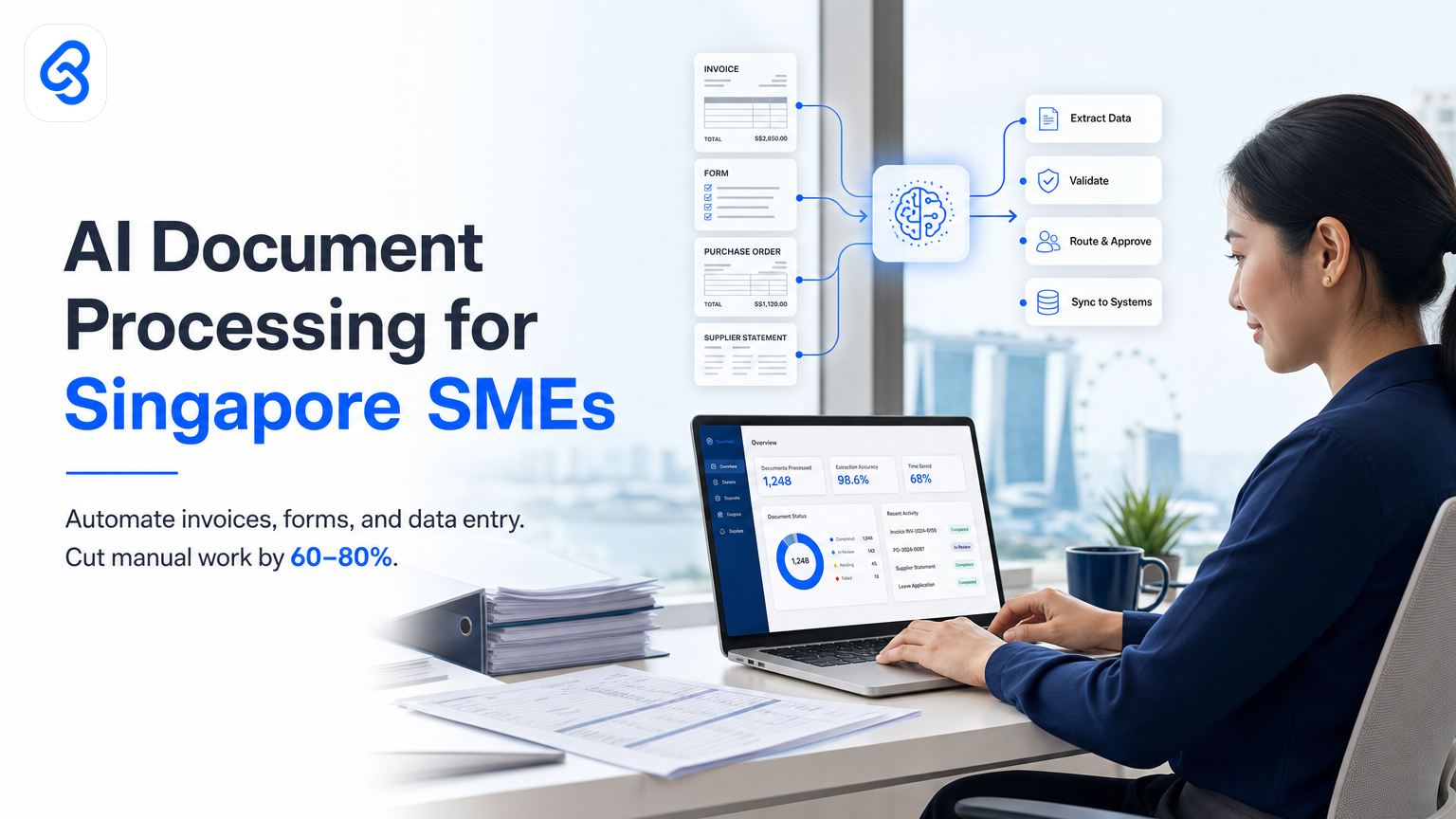
Your finance team spends two days a week typing invoice data into spreadsheets. Your operations manager manually checks approval forms. Your admin staff enters customer details from application forms into three separate systems.
These are not small problems. They compound across the year: lost hours, duplicate data, delayed approvals, and staff burnout. Yet when you search for "AI document processing Singapore SME consultant Singapore," most results offer you a product demo or a generic overview of what AI can do. Few explain whether it actually fits your business, what it costs, or how to know if you should do it.
This guide is different. We focus on real Singapore SME workflows, the specific tools and approaches that work, the risks you should watch for, and the decision framework you need to move forward with confidence.
What Is AI Document Processing and How Does It Solve SME Problems?
AI document processing reads, extracts, and classifies business documents automatically. It finds invoice numbers, supplier names, and amounts in PDFs. It pulls applicant details from forms. It sorts incoming emails by type. It feeds that data directly into your systems without human copying.
For Singapore SMEs, the payoff is measurable: fewer data-entry errors, faster approvals, staff time spent on real work instead of copying. One construction firm recovered 12 hours per week by automating site report data capture. A services business cut invoice processing time from three days to same-day entry.
The catch is simple but important: this only works if your current process is clearly defined and your documents have a consistent format. Automating chaos just creates fast chaos.
Why Do Singapore SMEs Actually Need This Right Now?
Your competitors are not waiting. When the Ministry of Trade and Industry aligns with IMDA on the SMEs Go Digital initiative, it signals that Singapore's business environment expects digital-first operations. The initiative supports SMEs in adopting impactful digital solutions that streamline operations and build capabilities for growth in the digital economy. Clients expect faster responses. Tax deadlines do not move. Auditors want clear trails.
More immediately, labour cost in Singapore is high and growing. Reskilling existing staff into higher-value work beats hiring more data-entry workers. And if your team works with documents at all (invoices, purchase orders, expense claims, application forms, contracts, reports), you have already paid people to handle them. You are just paying twice: once to do the work, and again to redo it in systems.
One SME owner we consulted told us: "We thought automation was a future thing. Then we realized we were spending SGD 3,000 a month on labor just to move data around. That changed how we looked at it."
Beyond private sector efficiency, Singapore's approach to digital adoption is now central to modern business operations. Your SME faces the same pressure to modernise and stay competitive in a fast-moving market.
How Does AI Document Processing Actually Work in Practice?
The workflow has three core steps: capture, extract, route.
Capture is what it sounds like: the document arrives (email attachment, scanned paper, web upload, API feed). You do not need perfect scans. Modern AI handles skewed photos, faded text, and handwriting better than you might expect.
Extract is where the AI reads the document and pulls out the fields you care about. For an invoice, that is supplier name, invoice number, date, line items, total amount, payment terms. For an expense claim, it is employee name, date, category, amount, business purpose. For an application form, it is contact details, employment history, qualification proof. The AI learns your document types and the patterns it should look for.
Route sends the extracted data where it needs to go: into your accounting system, approval workflow, CRM, stock database, or HR platform. This is where the real time saving happens. No manual copy-paste. No re-keying. No waiting for someone to find time to process the backlog.
Common pitfalls: teams often skip step one (defining exactly which documents matter and why), which means they automate the wrong workflows. Or they extract too much data and end up with messy, hard-to-use datasets. Or they route to a system with poor validation, so bad data enters the pipeline.
The best starting point is your biggest pain point. If accounts payable is drowning in invoices, start there. If hiring takes too long because of manual form processing, start there. Do not try to automate everything at once.
What Tools and Technologies Do SMEs Actually Use?
The landscape splits into three categories: low-code/no-code platforms, AI-native document services, and custom integrations.
Low-code platforms (think Zapier, Make, or similar) work if your documents are highly standardized and you have simple routing. They are fast to set up and keep running costs low. They break down when your invoices come from ten suppliers in different formats, or when your forms require conditional logic.
AI-native document services (OpenAI's vision APIs, Google Document AI, Azure Form Recognizer) handle messy, varied documents well. They scale well. They cost per-page or per-API call, which is good for volume but becomes expensive if you process hundreds of documents daily. These power most professional document automation.
Custom integrations combine these with your own logic. You might use an AI service to extract data, then route it through custom validation rules before it enters your systems. This approach costs more upfront but handles edge cases and gives you full control.
For most Singapore SMEs, the right answer is a hybrid: AI extraction from a proven service, feeding into a workflow platform that connects to your systems. This balances cost, accuracy, and control.
See our detailed guide on document processor AI for Singapore SMEs for a deeper technical breakdown of these options.
Where Should You Start? A Decision Framework
Ask yourself these questions in order:
1. Do I have a specific document workflow that is breaking or expensive right now? Name it. Invoices? Expense claims? Applications? Quotes? If you cannot name it, you are not ready. Broad automation bets fail.
2. Are these documents mostly digital or mostly paper? If paper, you need scanning or photography. That adds cost and error. Digital documents are 3-5x easier to automate.
3. Is my document format consistent? If your suppliers send invoices in wildly different layouts, you need more sophisticated AI. If they are mostly the same, simpler tools work. Be honest here: competitors' invoices count as "different."
4. What system does this data need to go into? Is it your ERP, your accounting software, your CRM, a spreadsheet, a custom database? Can it accept API inputs or batch uploads? If integration is hard, the whole project gets harder.
5. How many documents do you process monthly? If it is fewer than 50, you might be better off just cleaning up the manual process (templates, checklists, faster human workflows). If it is 500+, automation clearly pays for itself.
6. Who owns this process today and what do they think? If your finance manager sees automation as a threat, the project will fail. If they are drowning and desperate, they will advocate for it. Talk to the person doing the work first.
Score yourself here: if you have clear answers to all six questions, you have product-market fit for automation. If you have three or fewer answers, you need to do more discovery before spending money.
Real Examples: Three Singapore SME Scenarios
Scenario 1: Import/export trading firm
Problem: Purchase orders arrive via email PDF from a mix of suppliers. A staff member manually enters supplier name, part numbers, quantities, and unit prices into the accounting system. This takes 4-several hours each week.
Solution: AI extraction picks supplier and line-item data from the PDF. A workflow sends this to the accounting system where a human approves it (because trading requires judgment on terms and stock levels). Data entry drops to 30 minutes per week.
Tools used: Document AI extraction service plus a no-code workflow platform connecting to the accounting software.
Pitfall avoided: The team did not try to auto-approve orders. Humans still decide if an order is legitimate and stock-ready.
Scenario 2: Professional services firm (accounting, consulting, law)
Problem: Expense claims arrive via email with a mix of PDF receipts, photos, and form data. Processing one claim takes 20 minutes (reading, sorting, entering into the expense system, chasing missing info).
Solution: AI extracts merchant, date, amount, category from each receipt. A workflow routes incomplete claims back to the employee for missing data. Complete claims flow straight to finance for approval and payment.
Impact: Processing time drops from 20 minutes to 5 minutes per claim. No more chasing people for missing receipt photos.
Tools used: Multi-document extraction AI plus workflow automation.
Pitfall avoided: The team did not rely only on AI categorization. Some categories (entertainment vs. client dinner, legitimate vs. personal) required a human final check.
Scenario 3: SME with a simple ERP and lots of customer forms
Problem: Customer application forms come via email and web upload. A staff member re-enters name, email, phone, company, job title, and industry into the CRM. This is about 8 hours per week of pure copy-paste.
Solution: AI extracts the form fields. A simple integration pushes this straight to the CRM. No human handling unless validation fails.
Impact: 8 hours freed up. Customers see faster response time because the CRM is updated same-day, not next week.
Tools used: Form-specific document extraction (forms are simpler than invoices) plus a direct CRM API integration.
Pitfall avoided: The team realized mid-project that their form had no email field. They added it to the form template before rolling out automation, saving rework.
What About Costs, Integrations, and ROI?
Typical cost structure:
- AI extraction service: SGD 0.01 to SGD 0.20 per document, or SGD 200-500 per month for lower volumes.
- Workflow platform: SGD 100-300 per month.
- Integration work (if your system is not a standard platform like Xero or SAP): SGD 2,000-10,000 one-time, depending on complexity.
- Ongoing support: budget SGD 500-2,000 per month if you use a consultant, or SGD 0 if your team owns it after setup.
ROI calculation:
If one person spends 10 hours a week on document processing at an effective cost of SGD 35 per hour, that is SGD 18,200 per year. If automation reduces this to 2 hours per week (because some edge cases still need human review), you save SGD 14,560 per year. Minus automation costs of SGD 3,000-6,000 per year, your net saving is SGD 8,560-11,560 annually.
At that rate, the project pays for itself in 3-6 months. If you have multiple people doing this work, the math gets much better.
The catch: these numbers assume you have clear data on current time spend and a system ready to integrate with. If you are guessing about either, your ROI math will be wrong.
How Do Singapore SMEs Get Support and Funding?
Enterprise Singapore and IMDA both run capability-building programs that can help offset costs. Enterprise Singapore's Boost Capabilities program supports automation adoption through a range of schemes. IMDA's SMEs Go Digital initiative targets digital transformation including process automation, with a focus on simplifying adoption of impactful digital solutions and building SME capabilities.
Check the official program pages for current eligibility, application deadlines, and co-funding percentages. These change, and you need exact details before budgeting. Do not assume your firm qualifies or that approvals are fast. Allow 8-12 weeks for any grant process.
Grant support helps, but do not let it become the bottleneck. Many SMEs build automation first, then apply for retrospective support. Others use the grant to expand a pilot that worked.
The real decision is not "can I get a grant?" but "will this solve my actual problem, and can I afford to run it if no grant comes through?"
Risk, Common Mistakes, and How to Avoid Them
Mistake 1: Automating poorly defined processes
You cannot automate a workflow you do not understand. Before you automate expense claims, spend a week documenting your actual process: who fills out the form, how do they know what to claim, where does it go, who approves it, what happens if something is missing. Fix obvious problems (missing required fields, broken handoff rules) before you automate. Compliance and regulatory clarity matter too; refer to ACRA's how-to guides to understand what documentation and approval trails your automated system must maintain for corporate compliance.
Mistake 2: Over-extracting data
Just because the AI can pull out 20 fields does not mean you need all 20. Extract only the fields you actually use. Too much data creates noise, makes validation harder, and slows down your downstream systems. More data is not better.
Mistake 3: Skipping validation
Never send AI-extracted data directly to your financial systems without at least a spot-check process. An AI might confidently extract "1000" as "10000" from a smudged document. One wrong invoice kills trust. Set up simple validation rules: amounts over a threshold require human approval, missing fields trigger a re-request, supplier names are checked against your approved list.
Mistake 4: Assuming "set and forget"
Document formats change. Suppliers update their invoice template. Your ERP system gets updated. The AI model you chose becomes less accurate. You need a person (often part-time) who monitors the automation, catches errors, and fixes drift. This is not a cost you can ignore.
Mistake 5: Not involving the team early
The people who will use this automation need to understand why it exists and how it helps them. If your staff fear the system will replace them, they will sabotage it. If they understand it frees them from repetitive work, they will help refine it. Have the conversation before you build.
What Does a Realistic Implementation Timeline Look Like?
Weeks 1-2: Discovery and process mapping
You and your consultant or team define the exact workflow, document types, current pain, and success metrics. You gather sample documents. You identify the target system for output.
Weeks 3-4: Tool selection and integration design
You choose the AI service, workflow platform, and integration approach. You build a test setup with 10-20 sample documents.
Weeks 5-6: Pilot and refinement
You run the automation on real documents from the past week. You catch errors, adjust extraction rules, refine validation logic. You involve the team that uses it daily.
Week 7: Soft rollout
You run the automation in parallel with the manual process for a week. Real documents flow through both paths. You compare accuracy, timing, and cost.
Week 8+: Full deployment and monitoring
You switch off the manual process (or keep it as a fallback). You monitor quality, error rates, and time savings weekly. You adjust as needed.
This is realistic if you have a clear use case, existing system integrations, and a team that owns implementation. If you need significant custom development, add 4-6 weeks.
Should You Build This Yourself or Hire a Consultant?
Build yourself if:
- Your workflow is simple (forms to a single system, no conditional logic).
- Your team has someone who codes or manages workflow platforms.
- You have time for a 2-3 month learning curve and debugging.
- Your budget is under SGD 5,000 total.
Hire a consultant if:
- Your workflow touches multiple systems or has complex conditional logic.
- You need fast deployment and cannot afford weeks of trial-and-error.
- You want confidence that the right tool was chosen, not just the one you found first.
- Your documents are messy or variable in format.
- You want someone to own the long-term monitoring and refinement.
The consultant model costs more upfront but usually saves money overall because you avoid wrong tool choices, bad integration patterns, and the cost of failure and rework. Learn more about how to implement this properly in our guide on document management AI tools for Singapore SMEs.
For specific needs around invoice and accounts payable workflows, see our detailed resource on invoice and accounts payable automation for Singapore SMEs.
Frequently Asked Questions About AI Document Processing
How accurate is AI document extraction, really?
Modern AI gets 95-99% accuracy on structured documents like invoices from known suppliers. It drops to 80-90% on variable documents like expense receipts or handwritten forms. The key is that you never trust the AI output alone. You validate with business rules (amount range checks, supplier verification, required fields) and spot-check samples weekly. Accuracy is good enough for automation if you build in guardrails.
Will this replace my admin staff or finance person?
No, it reshapes their role. Instead of data entry, they become data validators, exception handlers, and process improvers. For a team of three doing data entry, you might reduce to one person doing quality checks and handling the 3-5% of edge cases. The other two move to higher-value work. If you tell them this upfront, they often support the change.
What if our documents are a mess and our formats keep changing?
You have two options. First, tidy up your source documents. Add a required field to your form. Ask suppliers to send invoices with a standard format (many are willing if you ask). Second, use more sophisticated AI that learns variation. This costs more but handles messier inputs. Start with option one. It often costs less and forces you to improve your process anyway.
Can we automate just part of our workflow to start?
Yes, and this is exactly what you should do. Automate a subset of invoices (e.g., all invoices from your top three suppliers, which have consistent formats). Automate a category of expenses (meals and travel, not client gifts or professional development, where rules are fuzzy). Run the pilot for 4-6 weeks, measure the impact, then expand to the full workflow once you have confidence. This reduces risk and gives your team time to adapt.
What happens if the AI makes a mistake?
It gets caught by your validation layer or your human spot-check, and you adjust. You log the error, retrain the model if needed, and refine the rules. This is normal. The goal is not zero errors; it is fewer errors than humans make, and errors that are easy to spot and fix. Most teams hit this sweet spot by month two of operation.
How do we ensure data security and compliance?
This depends on your industry and data type. If you handle personal data (names, ID numbers, medical records), you must comply with Singapore's Personal Data Protection Act. Store extracted data in approved systems, use encrypted connections, limit access to approved personnel, and audit access logs. Discuss security requirements with your AI service provider and integration team upfront. Do not assume any vendor is compliant with your rules; verify and document it. The CSA Singapore resources provide guidance on data protection and cybersecurity practices relevant to SME automation projects.
Next Steps
Document automation is not exotic anymore. It is a practical, proven way for Singapore SMEs to reclaim time and reduce errors. The decision is not whether you should do it, but when and where to start.
Begin with your most painful document workflow. Define it clearly. Count the hours it costs. Then run a short pilot with a tool that fits your constraints and budget. You will know within 6-8 weeks whether it works for you.
If you want hands-on help designing or implementing a pilot, we work with Singapore SMEs on exactly this. Start by exploring AI document processing in Singapore to see how other SMEs have approached automation. Most SMEs are surprised how achievable this is, and even more surprised at how much time they reclaim.